Key Metrics Every Startup Should Track
You know that feeling when an investor asks about your churn rate and you realize you’ve been calculating it wrong? Or when your co-founder wants to know how much it costs to acquire a customer, but the data’s scattered across Stripe, Google Analytics, and three different spreadsheets?
Startups die from a thousand small decisions made without data. Not because founders are incompetent, but because tracking the right metrics is a lot of work.
You need SQL knowledge here, a data engineer there, and suddenly you’re three months into building a dashboard when you should be building your product.
But what if you could actually track what matters without becoming a data scientist? Let me walk you through the metrics that genuinely move the needle for early-stage startups, and how modern tools are making this ridiculously easier than it used to be.
The Metrics That Actually Matter
Total sign-ups? Page views? Those feel good. They’re what I call “feel-good metrics” impressive on a slide deck but useless for making decisions.
The metrics that matter are the ones that tell you if your business is working. And honestly? There aren’t that many of them.
Monthly Recurring Revenue (MRR) and Annual Recurring Revenue (ARR)
If you’re running a SaaS startup, MRR is the key. It’s not just revenue, it’s predictable revenue. The kind that lets you plan two months ahead instead of panicking every 30 days.
MRR breaks down into a few flavors:
- New MRR from fresh customers
- Expansion MRR when existing customers upgrade
- Contraction MRR when they downgrade
- Churned MRR when they leave
Most founders I’ve talked to calculate this in spreadsheets. They pull Stripe data, export it to CSV, do some formulas, and hope they didn’t mess up the calculation. It works until it doesn’t, usually right before a board meeting.
With something like Livedocs, you’re connecting your Stripe account, asking the AI “show me my MRR breakdown,” and getting a visual dashboard in literally 90 seconds. No SQL queries. No pivot tables. Just the answer.
Customer Acquisition Cost (CAC)
CAC tells you what you’re paying to acquire each customer. It’s your total sales and marketing spend divided by the number of new customers in that period.
Sounds simple, right? Except you need to factor in salaries, ad spend, software tools, content creation costs, and about twelve other things. Then you need to decide if you’re looking at a 30-day window or a 90-day window because sales cycles exist.
The real question isn’t just “what’s our CAC?” It’s “can we afford this CAC given our customer lifetime value?”
Here’s where most startups mess up—they look at CAC in isolation. A $500 CAC might be amazing if your customer lifetime value is $5,000. It’s terrible if it’s $600.
Churn Rate:
If CAC is what keeps you honest, churn is what keeps you up at night.
Your churn rate shows what percentage of customers cancel each month. And let me tell you, a “small” churn rate compounds like reverse interest. Lose 5% of customers monthly? You’re losing over half your customer base annually.
The math is brutal: (Customers Lost ÷ Total Customers at Start of Period) × 100
But raw churn doesn’t tell the whole story. You need to look at revenue churn too, because losing ten $10/month customers hurts less than losing one $1,000/month customer.
Most teams calculate this wrong initially. They’ll count cancellations but forget about failed payments, or they’ll look at gross churn without considering expansion revenue from existing customers. Net revenue retention is where the real story lives.
Burn Rate and Runway
Your burn rate is how quickly you’re spending money each month. Your runway is how long you can survive at that burn rate before you hit zero.
These aren’t glamorous metrics. Nobody brags about their burn rate at a conference. But every investor asks about them in the first ten minutes because they determine if you’ll be around long enough to figure everything else out.
Calculate monthly burn: Total Cash Spent - Revenue Generated
Calculate runway: Current Cash ÷ Monthly Burn Rate
The scary part? These numbers change constantly. A new hire increases burn. A big enterprise deal extends runway. You need to monitor this weekly, not quarterly.
Activation Rate
You got someone to sign up, congrats! Now, did they actually do anything with your product?
Activation rate measures the percentage of users who complete key actions that correlate with long-term retention. For Slack, it might be “sent 2,000 messages.” For Figma, maybe “created and shared a design file.”
The tricky part is defining what “activated” means for your product. It’s not just “logged in twice.” It’s the specific behavior that makes users stick around.
This metric requires connecting user behavior data from your product analytics (Segment, Mixpanel, Amplitude) with your customer data. That’s historically been a pain, export from one tool, import to another, write formulas, pray nothing breaks.
Why Startups Struggle with Metric Tracking
The problem isn’t that founders don’t know which metrics matter. Everyone knows they should track CAC and churn. The problem is the friction.
Think about what you normally need to do:
- Export data from Stripe
- Pull analytics from Google Analytics
- Grab ad spend from Facebook and LinkedIn
- Combine everything in a spreadsheet
- Build formulas that break every time you update them
- Remember to do this every week or month
- Hope you calculated everything correctly
By the time you’ve built one dashboard, your metrics have changed, or you’ve added a new tool, or you need to show something different to investors.
There’s also the knowledge gap. Not every founder knows SQL. Not every startup has a data analyst on day one. You’re stuck between “I need these numbers” and “I don’t have the skills or time to get them.”
Building Metrics That Don’t Suck
Let’s talk about how you’d actually build these metrics without wanting to throw your laptop out the window.
The traditional approach involves:
- A data warehouse (hello, setup hell)
- SQL queries (hope you remember JOIN clauses)
- Visualization tools (more subscriptions!)
- Someone to maintain it all (more headcount!)
The modern approach? Connect your data sources, ask natural language questions, and get answers.
With Livedocs specifically, you’re looking at a workflow that’s super simple:
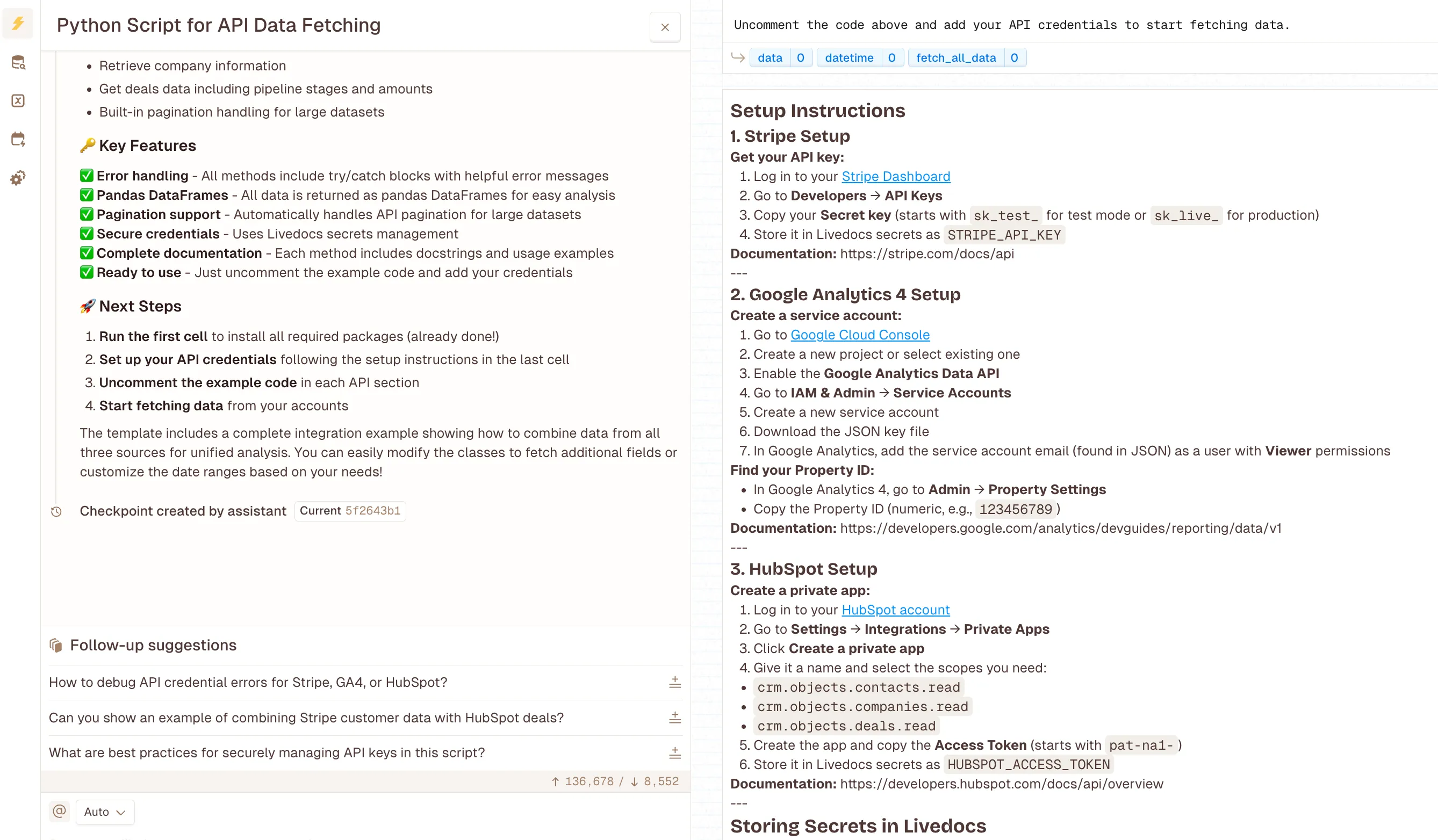
Step 1: Connect Your Data Sources
Upload your dataset, ask Livedocs agent to fetch any data sources online, or ask it to build a python script for you to fetch data from your Strip account, Google Analytics, HubSpot, Segment accounts.
Step 2: Ask for What You Need
Instead of writing “SELECT SUM(amount) FROM transactions WHERE status = ‘succeeded’,” you type “show me my MRR for the last six months.” You can ask follow up questions.
The AI understands context. It knows MRR means recurring revenue, not one-time payments. It formats currencies correctly. It groups by month automatically.
Step 3: Turn Answers into Dashboards

Those answers become interactive visualizations. Add filters, date ranges, breakdowns by customer segment. Share them with your team. Schedule them to update automatically.
What used to take a data engineer three days now takes you three minutes.
Real Examples: Building Core Metrics in Livedocs
Let me give you specific examples, because abstract explanations are useless.
Building MRR Tracking:
Connect Stripe. Ask “break down my MRR by new, expansion, contraction, and churned.” You’ve got a stacked bar chart showing exactly how your revenue is growing (or shrinking).
Want to see MRR by pricing tier? “Show MRR breakdown by plan.” Need to track a specific cohort? “Show MRR for customers who joined in Q4 2024.”
The AI pulls from your Stripe data, does the calculations, and creates visualizations that actually make sense.
Calculating True CAC:
Here’s where it gets interesting because CAC requires multiple data sources. You need ad spend (Facebook Ads, Google Ads), sales salaries (your payroll system or a manual input), and new customer count (from Stripe or your CRM). Traditionally, you’d export from three places, combine in Excel, write formulas, and update manually.
With Livedocs, you connect those sources and ask “what’s my customer acquisition cost for the last quarter, including all marketing spend and sales costs?”
It pulls ad spend data, combines it with any manual cost inputs you’ve added, divides by new customers, and gives you CAC. Then it can show CAC trending over time, or CAC by acquisition channel.
Tracking Churn Properly:
Churn is deceptively complex. You need to account for voluntary cancellations, failed payments, downgrades, and upgrades. Connect your subscription data and ask “show me gross revenue churn and net revenue churn for the last six months.”
The system understands that gross churn only counts losses, while net churn factors in expansion revenue. It automatically excludes free trials that were never converted. It handles the edge cases you’d spend hours debugging in a spreadsheet.
Monitoring Activation:
This requires product analytics data. Connect Segment or Mixpanel, define what “activation” means in your context—maybe it’s “completed onboarding” or “performed three key actions within a week.”
Ask “what percentage of users who signed up last month reached activation?”
You get a funnel showing drop, off at each step, completion rates, and time-to-activation metrics. All without writing event queries or building custom dashboards.
Common Mistakes
Let me save you from the mistakes I’ve seen founders make repeatedly:
Mistake #1:
Tracking Too Many Metrics You don’t need 47 metrics. You need maybe eight. Focus on what actually influences decisions.
Mistake #2:
Mixing Vanity with Value Total sign-ups feel good but don’t tell you if your business works. Focus on metrics that predict sustainability, retention, revenue, unit economics.
Mistake #3:
Not Defining Metrics Consistently If you calculate MRR three different ways across three different reports, you’ll confuse everyone, including yourself. Define it once. Stick to it.
Mistake #4:
Updating Metrics Manually If updating your dashboard requires an hour of copy-pasting from different tools, you’ll stop doing it. Automated updates or you’ll fail.
Mistake #5:
Making Metrics Too Complicated Your metrics should answer simple questions. “Are we growing?” “Are we profitable?” “How long until we run out of money?” If you need a PhD to understand your dashboard, start over.
Final Thoughts
If you’re reading this thinking “this all sounds great but I barely passed high school math,” good news, you don’t need to be a data person to track metrics that matter.
Start with three metrics:
- Revenue (or MRR if you have subscriptions)
- Customer acquisition cost
- Churn or retention
Get those three working. Understand them deeply. Make sure they’re updating automatically. Then add more.
The tools exist now to make this ridiculously simple. Livedocs, along with similar modern data platforms, removed the technical barriers. You don’t need to know SQL. You don’t need a data team. You just need to connect your tools and ask questions. Your startup probably won’t fail because of a bad product idea. It’ll fail because you didn’t notice churn creeping up, or you didn’t realize CAC was eating your runway until it was too late.
To make your own analysis like this? Use Livedocs.
- 8x speed response
- Ask agent to find datasets for you
- Set system rules for agent
- Collaborate
- And more
Get started with Livedocs and build your first live notebook in minutes.
- 💬 If you have questions or feedback, please email directly at a[at]livedocs[dot]com
- 📣 Take Livedocs for a spin over at livedocs.com/start. Livedocs has a great free plan, with $10 per month of LLM usage on every plan
- 🤝 Say hello to the team on X and LinkedIn
Stay tuned for the next article!